Prince William County Public Schools
The PWCS Portal provides students, teachers, and staff with an efficient interface that facilitates one-click access to instructional applications.
The PWCS Portal offers QuickCard sign-in, similar to Clever Badges, ensuring easy access for students in grades Pre-K–2 and students with specific accommodations.
How to Log In to the PWCS Portal
Students need to log in to the PWCS Portal on a computer or a mobile device to access PWCS instructional software and resources.
Computer Login Instructions
Student login instructions when using a computer
- Open a web browser and visit https://login.classlink.com/my/pwcs
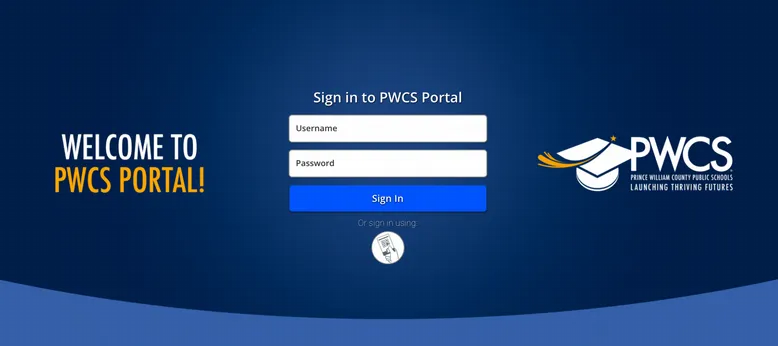
- Enter the student's PWCS username (do not include @pwcs-edu.org)
- Enter the student's PWCS password
- Click Sign In
- You're in! Students can access apps in the PWCS Portal.
Mobile Device Login Instructions
Student login instructions when using a mobile device (phone, tablet, iPad)
- Download the ClassLink LaunchPad app
- Install and open the app
- When logging in for the first time, select Find your login page and type in Prince William County Public Schools.
- Select Prince William County Public Schools (Global- Prince William County Public SD)
- Log in
- Enter the student's PWCS username (do not include @pwcs-edu.org)
- Enter the student's PWCS password
- Click Sign In
- You're in! Students can access apps in the PWCS Portal.
Logging in Using a QuickCard
Students in grades PreK–2 and other designated students may use a QuickCard with a QR code to log in to the PWCS Portal.
- Students should have received a QuickCard from their classroom teacher.
- The computer or wireless device must have a camera to use this feature.
QuickCard Log In Instructions
Student log in instructions for using a QuickCard
- Open PWCS Portal
- Computer - open your web browser and type https://login.classlink.com/my/pwcs
- Mobile device - open the ClassLink app
- Click on the QuickCard image icon located under the sign in button
- If this is the first time accessing the PWCS Portal, you will need to click "Allow the camera while visiting the site"
- When the QuickCard window opens, scan the QR code on the QuickCard using the camera.
- You're in! Students can access apps in the PWCS Portal.
Need Help?
Student usernames and email addresses can be found in the Student Info Area section of ParentVUE or by contacting your student's school.
If your student does not remember their PWCS password, please use Password Self Service to reset their password.
If you have any problems with the PWCS Portal or need to request a QuickCard, submit a general help request or call the PWCS Customer Contact Center at 703-791-8826.