Prince William County Public Schools
Reset Your Password
If you have forgotten your password or your password has expired, you can reset it using the self-service options below.
Select your user type to get started.
Students
Reset Your Student Password
Students can reset their password using the Student Password Self-Service tool.
Parents / Guardians
Reset Your ParentVUE or Canvas Password
Parents and guardians can reset their ParentVUE and/or Canvas password online.
Select "Forgot Password" from the login screen and follow the prompts to reset.
Employees
Reset Your Network Password
This self-service feature is only available to staff members who have previously entered their personal email address in the Profile section of Toolbox.
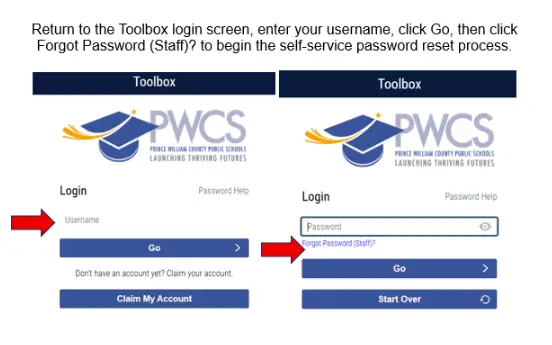
Follow the steps below to reset your password using the PWCS Toolbox self-service password reset feature.
- Go to the PWCS Toolbox login page.
- Enter your PWCS username in the Username field.
- Click the Go button to proceed to the password screen.
- Click the Forgot Password (Staff)? link located below the password field.
- Follow the on-screen prompts to complete the self-service password reset process.
- Create and confirm your new password when prompted.
- Return to the Toolbox login page and sign in using your new password.
Note: If you experience issues during the reset process, contact the PWCS IT Help Desk for assistance.
Job Applicants
Reset Your Online Job Application System Password
If you are having trouble accessing your job application account, you may reset your password directly from the application portal login page.
Note: If you need assistance resetting your password, please call 703-791-8050 for a password reset. Do not create a new account.