Prince William County Public Schools
Registration Information
Online registration in Adult Education is always open; however, enrollment in most classes ends approximately 10 days before classes begin. For all students over 18 years of age, the registration must be submitted by the student with their own ParentVUE account; registrations may not be submitted by another person.
After your registration is submitted and reviewed by the Adult Education office, students will receive an acceptance email with follow-up class enrollment information. A pre-assessment is required before enrolling in any Adult Education classes. The email from the Adult Education office will have links to register for your pre-assessment. After your pre-assessment, a staff member will assist you in enrolling in class. Your non-refundable tuition payment is due at the time of your pre-assessment/class enrollment.
How to Register as a Student for Adult Education
Please contact the Adult Education Program if you have any questions regarding the application review and approval process.
-
Access your current ParentVUE account or Create an account if you do not have children in PWCS
- Go to the Online Registration Account and Records Access screen.
- Click the More Options tab, then click Create a New Account.
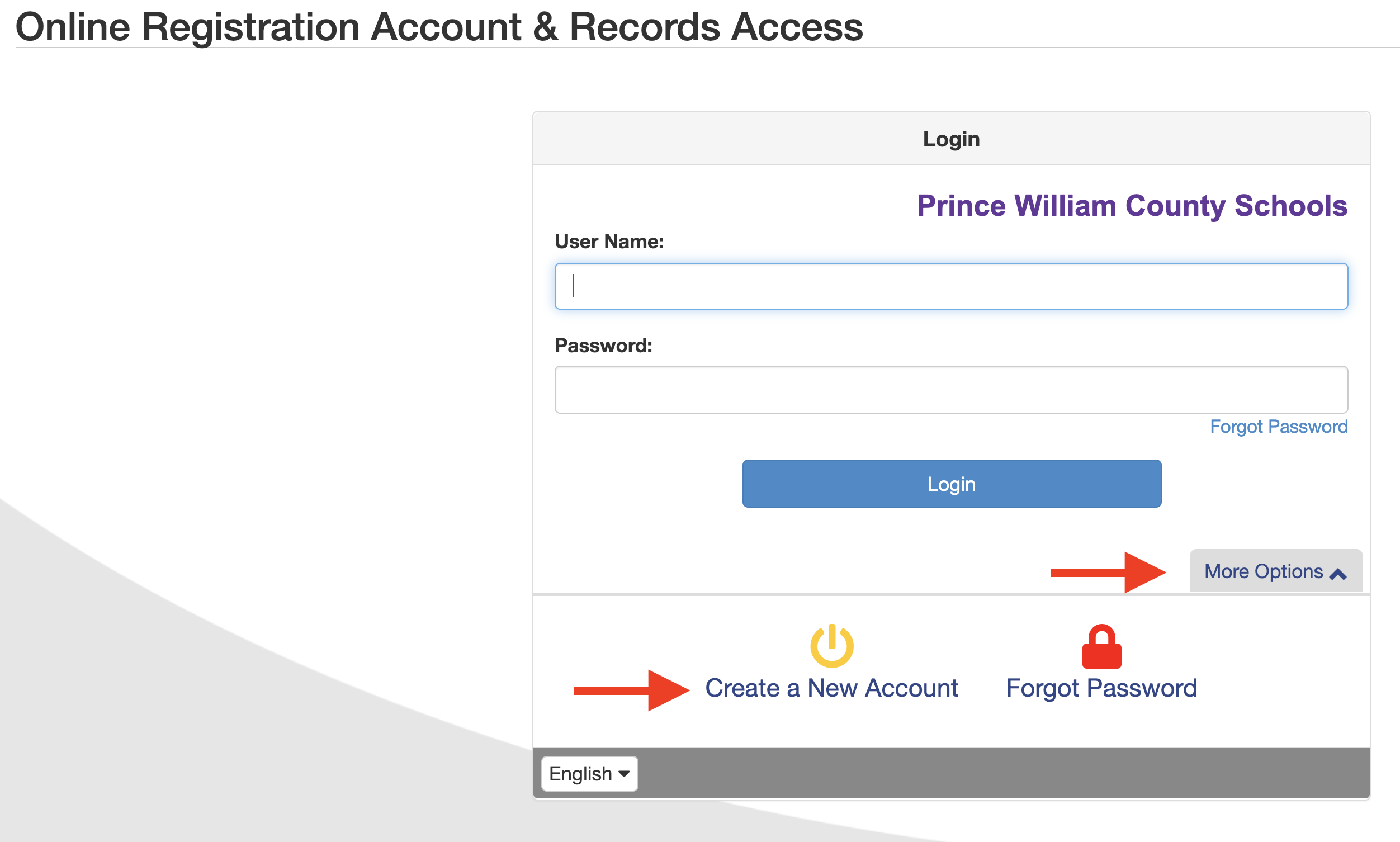
- Answer the Parent Account Activation questions and click Continue.
- If you answer YES to any of the questions, you already have an active ParentVUE account and will need to use your existing ParentVUE Username and Password. If you don't remember your password, select More Options from the ParentVUE login screen and choose Forgot Password. The Adult Education registration can be found under Online Records.
- If you answer NO to all the questions, continue to Step #4.
- Review the ParentVUE/StudentVUE User Agreement and I Accept to continue.
- Create your account by completing the following fields and click continue to Step #6.
- Legal First Name and Last Name – Please be sure to enter your name as it appears on government-issued identification. Your name as entered here will be used for your electronic signature.
- Email Address – An activation link will be sent to this email. Please be sure to enter a valid email address.
- Security Code – Provided at the bottom of the screen.
- A confirmation message will appear. You will receive an email that will contain a link that will allow you to complete your account creation and begin the enrollment process.
- Click the link in the email. The Complete Account Creation window opens.
- Complete the following fields to complete your account creation, then click Save and Continue.
- User ID – By default, your email address is listed, but it can be changed if desired.
- Password
-
Complete the Online Registration Application
- To use the online registration system, parents will access the system through their newly created/current PWCS ParentVUE account. On the Online Registration Account & Records Access screen, enter your ParentVUE Username and Password, and click Login.
- To register for Adult Education, scroll through the options and select Adult Education or Adult Education Returning Student for the designated school year.
- The Introduction Screen will display important information pertaining to online registration, including helpful links to Prince William County Public Schools enrollment resources and regulations. Review the information on this page before proceeding with your application, then click Continue.
- On the Electronic Signature page, you must enter your name exactly as it appears when you created your ParentVUE account. For example, if your name appears as John Smith or JOHN SMITH, you must enter it that way.
- On the Home Address field, start entering your street address, if a drop-down appears with your address, click on it. If not, enter the first 2 numbers of your address and press enter, this should populate the address boxes for you to manually enter your address.
- Follow the instructions and click Save and Continue at the bottom of each screen to move forward. As each section is completed, a green checkbox will appear next to the section name.
- Adult Education students will be both the "guardian" and the student to enroll.
-
Finalize Your Enrollment
- Once you have completed the online registration process, the Adult Education Program will send you an email with next steps to Class Enrollment information. Please be sure to check your junk or spam folder if you do not receive an email from Adult Education within five business days.
- Bring your photo ID (for security purposes/entrance to the building) and any other required documents that were not uploaded to your online application.
Reference Information for Adult Education Online Registration
Once a section has been completed, you may navigate back to the section by selecting the tab from the navigation tree on the left side of the screen.
Introduction Tab
- Student Summary - Displays all students associated with your parent record (regardless of their enrollment status). If any information is incorrect, please contact the Adult Education.
- Signature - Captures your electronic signature. Your name must be entered exactly as it appears in the upper right corner of the screen. By entering your electronic signature here, you are attesting that you are the account holder, are authorized to provide the information within this application for registration and agree that the information is accurate to the best of your knowledge.
Family Tab
- Home Address - Verify your home address. If your address has changed, enter your new address in the search field. Once your address displays, click it to populate the address fields. If your address is not found in the search, you may manually enter your home address in the address fields. Once entered, the home address should be formatted as it would on normal US Postal mail.
- If your address is outside of the PWCS boundaries, but you would like to be considered for enrollment at a PWC school, you may proceed with the application.
- Mail Address - by default, your address is presumed to be the same as your home address. If your mailing address differs from your home address, unselect the checkbox, and enter your mail address in the applicable fields. Once entered, the mailing address should be formatted as it would on normal US Postal mail.
Parent/Guardian Tab
This tab is for all parents and guardians who are associated with one or more student(s). Relationships to each student are defined later in the process on the Student tab. Only parents and guardians with legal rights to access the student's electronic records are to be included on this tab. If you are registering for Adult Education as an adult learner, you will need to fill in your information in the Parent/Guardian section. You will later need to also fill in your information as the student.
- Demographics – Verify all parent/guardian(s) associated with the student along with the parent's military connected status, if applicable. For existing parents, the names cannot be updated via online registration as this information has already been validated at a PWCS school. Please contact the school directly to make any name changes.
- Contact Information – enter the contact number and email address for the parent/guardian. All parent/guardians must have at least one phone number listed. An email address is required for enrolling parent.
Emergency Tab
Please review the existing contact information and add any emergency contacts as deemed necessary. It is encouraged to list at least one emergency contact.
- Demographics – at minimum, the contacts first and last name must be entered. Optionally, you may enter the address and preferred language for the emergency contact.
- Contact Information – enter at least one contact number for the emergency contact.
Students Tab
This screen displays a list of all students that are currently enrolled or were previously enrolled within the district. These students are read-only and are excluded from the registration process.
Click the Add new Student button to add the student(s) to be registered.
- Demographics – enter the student's information as it appears on their legal birth certificate. You will also select the parent with whom the student primarily resides.
- Additional Information – Enter the remaining student information as per their legal birth certificate.
- U.S. Entry Questionnaire – this screen will only display if the student was born outside of the United States or Puerto Rico. Answer of the applicable questions as they pertain to the student's entry into the U.S., most recent entry into the U.S., and their U.S. school history.
- Demographics – please provide the student's home and/or personal cell phone number, as well as a preferred name and/or personal email, as applicable. This contact information should be specific to the student. Parent/Guardian phone numbers are not to be listed here, and should be updated on the Parent tab.
- School Selection – select Adult Education.
- Ethnicity & Race – select the student's ethnicity and all applicable races associated with the student.
- Adult Student Profile Document (ASPD) – complete all fields on this screen. This screen captures information that all prospective adult education and literacy students must complete during intake.
- Relationships – This screen lists all Parents/Guardians that were entered on the Parent/Guardian tab. Please indicate the relationship that each Parent/Guardian has with the student indicated above. If you are registering as an adult, select Guardian as the relationship status between your parent and student account.
- Emergency Contact Relationships – indicate the relationship each emergency contact has with the student. Later, you will be asked to indicate your call order preference for all contacts.
- Emergency Contact Order – drag and drop the contacts in the order in which they should be contact in the event of an emergency.
Documents
Please upload all required enrollment documents here before the registration is submitted. For students under the age of 18 years old, the compulsory attendance release form must be uploaded prior to submitting the application.
- To upload documents using the web application: Click the Upload button or check the box indicating that a hard copy of the document will be provided to the school.
- To upload the documents using the ParentVUE mobile application: Tap the OLR Documents icon in ParentVUE to upload the document using the device's camera or by selecting files from the library.
Review/Submit
Prior to submitting your registration, you must review the application by clicking the Review button. To make any edits within the application, click the Edit button to the left of each of the section headings. Once the edits are made, click Save & Continue to return to the Review/Submit screen. Once you have reviewed the application, check the I have reviewed all registration data and verified that it is correct box, then click the Submit button.
- Once the application has been submitted, a confirmation box will appear. Press OK to submit the student registration information. From this point on you will not be able to make any further changes to the registration information in this portal; however, you may return to Online Enrollment to check the status of your submission.
- To check the status of your application, click the Status button.